安装DPDK
安装相关依赖包
//首次创建虚拟机
sudo apt-get update
sudo apt-get upgrade
apt install net-tools
apt install git
//DPDK编译依赖
apt-get install meson
apt install python3-pyelftools
apt-get install pkg-config
sudo apt install libnuma-dev
sudo apt install gcc-12
最后2条命令新增
编译DPDK
wget https://fast.dpdk.org/rel/dpdk-24.07.tar.xz
tar xf dpdk-24.07.tar.xz
cd dpdk-24.07
meson build
cd build
ninja
ninja install
注意:执行完之后所有的库都安装在 /usr/local/lib/x86_64-linux-gnu/ 目录。可执行程序和脚本都安装在 /usr/local/bin/ 目录。卸载只需执行 ninja uninstall 即可。至此环境安装完成。
验证DPDK环境
编译igb uio驱动
git clone http://dpdk.org/git/dpdk-kmods
cd dpdk-kmods/linux/igb_uio
make
编译DPDK实例demo
cd examples/l2fwd
make
挂载igb_uio驱动
cd dpdk-kmods/linux/igb_uio
modprobe uio
insmod igb_uio.ko intr_mode=legacy
分配大页内存:
echo 512 > /sys/kernel/mm/hugepages/hugepages-2048kB/nr_hugepages
DPDK绑定网卡
ifconfig ens34 down
ifconfig ens35 down
dpdk-devbind.py -b igb_uio ens34 ens35
查看网卡状态
df@df-virtual-machine:~/dpdk-22.07/dpdk-kmods/linux/igb_uio$ dpdk-devbind.py --status

Network devices using DPDK-compatible driver
============================================
0000:02:02.0 '82545EM Gigabit Ethernet Controller (Copper) 100f' drv=igb_uio unused=e1000
0000:02:03.0 '82545EM Gigabit Ethernet Controller (Copper) 100f' drv=igb_uio unused=e1000

Network devices using kernel driver
===================================
0000:02:01.0 '82545EM Gigabit Ethernet Controller (Copper) 100f' if=ens33 drv=e1000 unused=igb_uio *Active*
运行DPDK示例l2fwd
cd examples/l2fwd/build/
./l2fwd -l 0-1 -- -p 0x3 -T 1
注意:如果看到以下信息,说明 DPDK 环境没问题!
EAL: Detected CPU lcores: 8
EAL: Detected NUMA nodes: 1
EAL: Detected shared linkage of DPDK
EAL: Multi-process socket /var/run/dpdk/rte/mp_socket
EAL: Selected IOVA mode 'PA'
EAL: VFIO support initialized
EAL: Probe PCI driver: net_e1000_em (8086:100f) device: 0000:02:02.0 (socket 0)
EAL: Error reading from file descriptor 20: Input/output error
EAL: Probe PCI driver: net_e1000_em (8086:100f) device: 0000:02:03.0 (socket 0)
EAL: Error reading from file descriptor 6: Input/output error
TELEMETRY: No legacy callbacks, legacy socket not created
MAC updating enabled
Lcore 0: RX port 0 TX port 1
Lcore 1: RX port 1 TX port 0
Initializing port 0... EAL: Error enabling interrupts for fd 20 (Input/output error)
done:
Port 0, MAC address: 00:0C:29:0C:53:91

Initializing port 1... EAL: Error enabling interrupts for fd 6 (Input/output error)
done:
Port 1, MAC address: 00:0C:29:0C:53:9B

Checking link statusdone
Port 0 Link up at 1 Gbps FDX Autoneg
Port 1 Link up at 1 Gbps FDX Autoneg
L2FWD: entering main loop on lcore 1
L2FWD:  -- lcoreid=1 portid=1
L2FWD: entering main loop on lcore 0
L2FWD:  -- lcoreid=0 portid=0

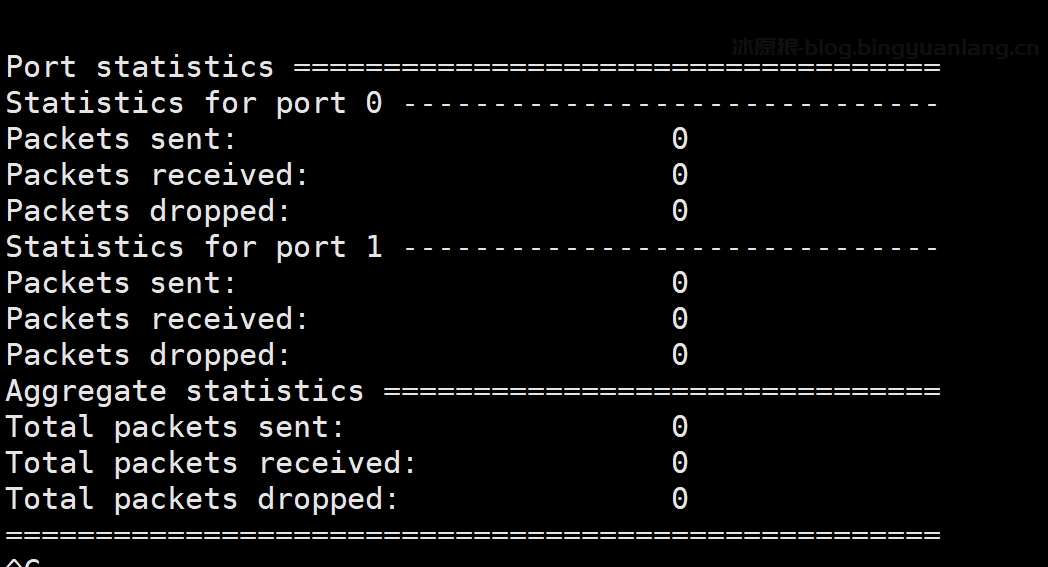
Port statistics ====================================
Statistics for port 0 ------------------------------
Packets sent:                        0
Packets received:                    0
Packets dropped:                     0
Statistics for port 1 ------------------------------
Packets sent:                        0
Packets received:                    0
Packets dropped:                     0
Aggregate statistics ===============================
Total packets sent:                  0
Total packets received:              0
Total packets dropped:               0
====================================================
^C

Signal 2 received, preparing to exit...
EAL: Error disabling interrupts for fd 20 (Input/output error)
Closing port 0... Done
EAL: Error disabling interrupts for fd 6 (Input/output error)
Closing port 1... Done
Bye...
执行后报错,错误的原因是没有访问大型页面的物理地址的权限,使用sudo执行即可。
df@df-virtual-machine:~/dpdk-22.07/examples/l2fwd/build$ ./l2fwd -l 0-1 -- -p 0x3 -T 1
EAL: Detected CPU lcores: 2
EAL: Detected NUMA nodes: 1
EAL: Detected shared linkage of DPDK
EAL: Multi-process socket /run/user/1000/dpdk/rte/mp_socket
EAL: FATAL: Cannot use IOVA as 'PA' since physical addresses are not available
EAL: Cannot use IOVA as 'PA' since physical addresses are not available
EAL: Error - exiting with code: 1
  Cause: Invalid EAL arguments
解绑网卡
//查看网卡 pci 设备号
df@df-virtual-machine:~# lspci | grep Eth
02:00.0 Ethernet controller: Intel Corporation 82545EM Gigabit Ethernet Controller (Copper) (rev 01)
02:01.0 Ethernet controller: Intel Corporation 82545EM Gigabit Ethernet Controller (Copper) (rev 01)
02:02.0 Ethernet controller: Intel Corporation 82545EM Gigabit Ethernet Controller (Copper) (rev 01)
02:03.0 Ethernet controller: Intel Corporation 82545EM Gigabit Ethernet Controller (Copper) (rev 01)
两个网卡设备号是 02:02.0 和 02.03.0
//解绑两个网卡的 igb_uio 驱动,绑定 e1000 驱动:
dpdk-devbind.py -u 02:02.0 02:03.0
dpdk-devbind.py -b e1000  02:02.0 02:03.0
//启动网卡
ifconfig ens34 up
ifconfig ens35 up